
Files & Archives
Before touching pixels or samples, treat the file as a structure. A huge fraction of "stego" challenges are really file-format tricks: something appended after the logical end, a second format hiding inside the first, or an archive masquerading as an image. None of these need pixel analysis — they need you to read the bytes.
Magic bytes and appended data
Every format starts with a magic signature
(list of file signatures).
file reads it to identify the type — but it only looks at
the start, so anything appended after the logical end is invisible to it.
$ file target
$ tail -c 200 target | xxd      # inspect the trailer
$ binwalk target                # list embedded signatures
$ binwalk -e target             # auto-extract them
The classic: a ZIP concatenated after an image. Because unzip reads the
central directory at the end of the file, an appended ZIP often just opens:
$ unzip target.png
$ 7z l target.png
Worked example: a ZIP appended to a PNG
cat.png is 4 MB but shows a small image — a size mismatch. binwalk
cat.png lists a Zip archive data signature at a nonzero offset. Because
the ZIP's central directory sits at the end of the file, unzip cat.png
opens it directly and extracts flag.txt — no carving needed. If the ZIP is
password-protected, fcrackzip -u -D -p rockyou.txt cat.png cracks weak
ZipCrypto; for AES, guess the password from the challenge instead.
If binwalk misses it, carve by header/footer with
foremost, or manually with dd once you know the
offset:
$ dd if=target of=payload.bin bs=1 skip=$OFFSET
Polyglot files
A polyglot is valid under more than one format at once — an image you can
view that is also a runnable JAR, or a PDF that is also a ZIP. file reports
only one type and will not flag the trick; look for multiple magic numbers
and trailing data. The common kinds:
- Simple — a plain concatenation of two files.
- Parasitic — one file fully contained inside another's structure.
- Mille-feuille — layers alternated by controlling the internal structure.
- Chimera — one body, several heads: several formats share the same data block (e.g. Zlib Deflate pixels) behind different headers, so one file renders as JPEG and PNG.
- Schizophrenic — a single format interpreted differently by different readers (a PDF whose JavaScript some viewers run, or the Gamma image trick).
- Angecryption — encrypting or decrypting the file yields another valid file (same or different format).
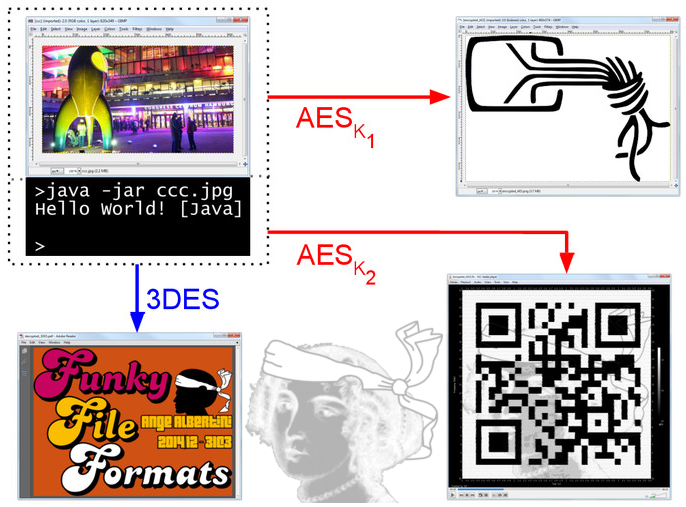
Corkami's file-format posters are the reference for
how these are built. To generate or dissect one:
mitra (python3 mitra.py a.png b.zip emits
every viable polyglot of a pair) and
truepolyglot
(truepolyglot pdfzip --input1 payload.zip --input2 doc.pdf out.pdf).
One file, or one file per parser?
The polyglot test is simple: open the same bytes with a different tool —
unzip a PNG, render a ZIP as a PDF. If a second tool succeeds, there is a
second payload.
Archives (ZIP and friends)
$ zipdetails -v target.zip       # full structure
$ zipinfo target.zip
$ 7z l target.zip
- Weak crypto: ZipCrypto leaks filenames and sizes and is plaintext-
attackable; AES-256 resists. Crack short ZipCrypto passwords with
fcrackzip -u -D -p rockyou.txt target.zip. - Known-plaintext attack (the bigger win): if you know ~12 contiguous bytes of any one entry — trivial when it is a PNG/PDF with a fixed header — bkcrack recovers the internal keys without the password and decrypts the whole archive:
$ bkcrack -C secret.zip -c inner.png -p known_prefix.bin      # recover 3 keys
$ bkcrack -C secret.zip -k <k0> <k1> <k2> -D unlocked.zip     # decrypt everything
Match the compression of your known plaintext
bkcrack attacks the compressed byte stream, not the raw file. If the
target entry is Deflate-compressed, your known-plaintext bytes must be
Deflate-compressed at the same level before you feed them with -p, or no
keys are found (you need ≥12 known bytes, ≥8 contiguous). It recovers the
keystream, not the password — but you can read the original password back
from the keys with bkcrack -k <k0> <k1> <k2> -r 10 ?p.
- Repair a broken archive with
zip -FF broken.zip --out fixed.zip. - Evasion tricks (seen in modern challenges): concatenated central
directories (7-Zip reads the first, WinRAR the last), overlapping entries,
and local-header vs central-directory mismatches. Detect duplicate end-of-
central-directory markers with
binwalk -R "PK\x05\x06".
Documents
Office (OOXML) — .docx, .pptx, .xlsx are ZIPs of XML parts:
$ 7z x report.docx -o report/
Inspect word/media/ (embedded images), word/_rels/ (relationships, external
resource pointers) and any custom XML parts. The same applies to .jar, .apk,
.odf — they are all valid archives, so check whether the file opens with a
tool other than the one its extension implies. For a macro-enabled document
(.docm/.xlsm), extract the VBA without opening Office:
$ olevba --decode target.docm # VBA source + de-obfuscation + IOCs
VBA stomping hides the real code as p-code
In a stomped document, olevba shows benign or empty source because the
genuine logic exists only as compiled p-code that Office actually runs.
Dump and decompile it with pcodedmp target.doc / pcode2code target.doc.
PDF — an object/stream container:
$ pdfinfo file.pdf
$ pdfdetach -list file.pdf && pdfdetach -saveall file.pdf   # embedded attachments
$ qpdf --qdf --object-streams=disable file.pdf out.pdf      # decompress for grep
Three PDF-specific hiding spots the basics miss:
- Retained earlier revisions. More than one
%%EOFmarker means the PDF was incrementally updated and old (e.g. "redacted") versions are still inside. pdfresurrect recovers them:pdfresurrect -q file.pdf(count), thenpdfresurrect -w file.pdf. - Compressed object streams hide content from
grep/strings. Expand them with Didier Stevens'pdf-parser.py -O -a file.pdf, and hunt actions withpdf-parser.py --search /JS/--search /OpenAction/--search /EmbeddedFile. - Optional Content Groups (
/OCG) are toggleable layers — one may be hidden.pdf-parser.py --search /OCG file.pdf, then enable it in a full viewer.
peepdf is a good interactive alternative.
Other containers and hiding spots
- SVG is XML — it renders fine while hiding
<script>,<!-- comments -->,<metadata>, or elements drawn outside theviewBox. Pretty-print and read it:xmllint --format file.svg | less, plusexiftool/strings; in Inkscape, Ungroup (Ctrl+Shift+G) and open the XML editor. - ICO / WebP / TIFF — ICO can bundle several images or embed a full PNG
(
icotool -x file.ico); WebP is a RIFF container (webpinfo, appended data after the RIFF size is invisible); TIFF can carry extra IFDs/tags (exiftool -a -u -g1 file.tif,tiffinfo).binwalkcatches appended data in all three. - NTFS Alternate Data Streams — a file's content can hide in a named stream.
Windows:
dir /r,Get-Content file -Stream secret. From an image: Sleuth Kiticat. .gitdirectories — the flag is often a deleted commit or a dangling blob:git log --all,git fsck --lost-foundthengit cat-file -p <sha>, andgit reflogfor rewound heads.- QR / barcodes in a recovered file →
zbarimg --raw file.png(upscale tiny codes first:convert file.png -resize 400% big.png).
Executables and binaries
An ELF / PE / Mach-O is also a carrier. Beyond the obvious (data appended after
the last section, odd strings, a payload in .comment / .rodata —
readelf -p .comment file, objdump -s -j .rodata file), data can hide in
semantic-dual instructions: swapping an instruction for an equivalent of the
same length encodes bits without changing behavior or file size. This is the
Hydan idea, revived by steg86:
$ steg86 profile binary          # how many bits this binary can carry
$ steg86 extract binary.steg     # recover the hidden message
The distribution shift it leaves is invisible to strings, binwalk and
file, so recognizing that an executable is the carrier is the whole trick.
Network captures (pcap)
Forensics challenges frequently ship a .pcap; the hidden file or message is in
the traffic:
- Files over HTTP/SMB/FTP →
tshark -nr cap.pcap --export-objects http,out/(orsmb,tftp), or Wireshark File → Export Objects. When that fails,tcpflow -r cap.pcapsplits each stream, thenbinwalk/foremosteach. - USB HID keyboard →
tshark -r usb.pcap -Y 'usb.capdata && usb.data_len==8'
  -T fields -e usb.capdata
piped into ctf-usb-keyboard-parser. If that field comes back empty, the capture may name itusbhid.datainstead — try both. Keyboard reports are always 8 bytes (modifier + reserved + up to 6 keycodes), so filter onusb.data_len==8to drop noise. - DNS / ICMP exfiltration → pull the payload fields
(
tshark -r cap.pcap -Y dns.qry.name -T fields -e dns.qry.name) and decode the subdomain labels — usually Base32 (DNS labels are case-insensitive, so Base64 fails), sometimes hex. Dedupe first (request and response repeat each name):… | awk '!seen[$0]++'. ICMP tunnels carry bytes indata.data. Repair a truncated capture withpcapfix cap.pcapbefore anything else.
File carving
When a disk image or blob contains many embedded files, carve them by signature:
| Tool | Notes |
|---|---|
| binwalk | Signature scan + -e / -Me recursive extract |
| foremost | Header/footer carving (/etc/foremost.conf) |
| scalpel | Config-driven carving |
| photorec | File-type-selective recovery |
| bulk_extractor | Carve URLs, emails, and embedded artifacts |
Related
- Drive a challenge from the cheatsheet.
- Appended data inside a PNG specifically: Images — PNG structure.